Conocimiento
Chatbot de base de conocimiento para B2B: respuestas desde tus documentos, no conjeturas
Un chatbot de base de conocimiento responde desde documentos aprobados con citas. Aprende cómo funciona RAG, qué cargar primero y cuándo rechazar frente a capturar un lead en sitios B2B.
Autor
The EngageLayer product & content team — guides on AI website assistants, knowledge-grounded answers, and B2B lead qualification.
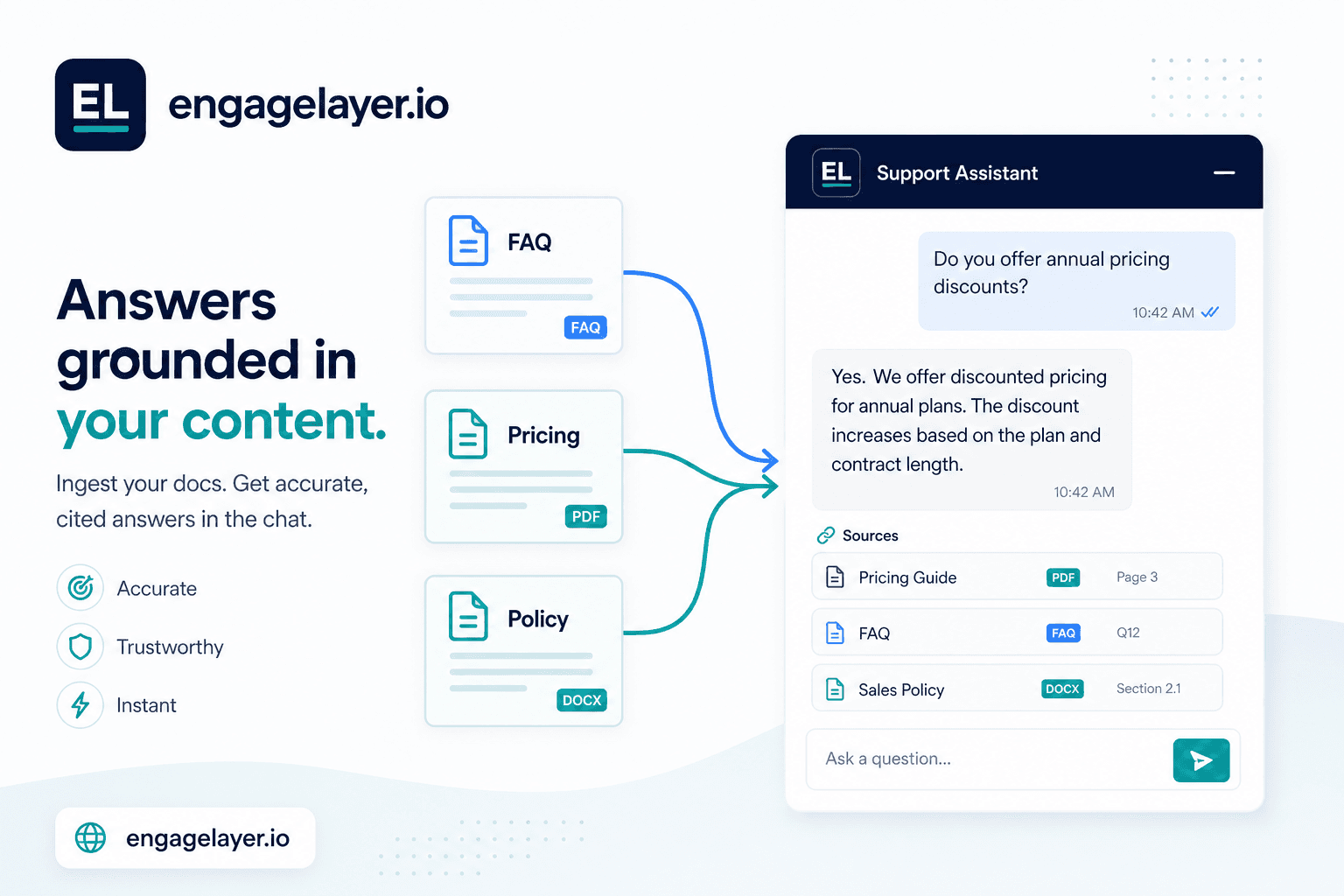
Respuesta rápida
Un chatbot de base de conocimiento responde a los visitantes recuperando primero el contenido aprobado y luego redactando una respuesta con citas. En sitios B2B, eso mantiene precios, políticas e integraciones anclados a lo que tu equipo ha publicado de verdad. engagelayer.io carga fuentes FAQ, texto y CSV, califica leads Hot / Warm / Cool y los envía a Pipedrive, correo o un webhook.
La mayoría de las herramientas de chat en web suenan útiles hasta que alguien pregunta por tus niveles de precio, la política de reembolso o los límites de integración. Un modelo genérico rellena el hueco con una frase plausible. Un chatbot de base de conocimiento hace algo distinto: busca lo que subiste, cita el pasaje relevante y solo entonces escribe la respuesta. Para equipos B2B que venden con confianza, esa diferencia no es cosmética. Es la línea entre una primera conversación útil y un ticket de soporte abierto el lunes a las 9 a. m.
Qué es realmente un chatbot de base de conocimiento
Piénsalo como una capa de búsqueda con una puerta conversacional. Le das una biblioteca: entradas FAQ, fichas de producto, guías de onboarding, filas CSV con límites de plan y quizá páginas rastreadas de tu sitio de marketing. Cuando un visitante pregunta, el sistema encuentra los chunks más cercanos, los pasa al modelo de lenguaje como contexto y le pide responder solo con ese material. La respuesta debe apuntar a la fuente. Ese patrón se llama retrieval-augmented generation, o RAG.
Un widget de chat LLM genérico se salta el paso de la biblioteca. Predice las siguientes palabras a partir de datos de entrenamiento que pueden incluir blogs SaaS al azar, foros antiguos y nada sobre tu empresa. Puede sonar pulido y seguir estando mal. Un chatbot fundamentado en documentos cede algo de creatividad abierta a cambio de precisión en los temas que te importan.
Por qué los sitios B2B necesitan respuestas fundamentadas
Los compradores B2B comparan proveedores durante semanas. Leen páginas de precios, docs de seguridad y listas de integraciones antes de reservar una demo. Cuando un widget inventa una función que no envías, o cita un precio que retiraste hace seis meses, la confianza desaparece rápido. Legal y finanzas lo notan, y procurement suele añadir otro ciclo de revisión.
Las respuestas fundamentadas también ayudan a ventas. Una respuesta citada da contexto a los reps: qué doc vio el visitante, qué objeción surgió y si la pregunta era de cumplimiento o de tiempo de implementación. Eso es más útil que un formulario que solo captura nombre y correo.
| Dimensión | Chatbot genérico | Asistente de base de conocimiento |
|---|---|---|
| Fuente de las respuestas | Datos de entrenamiento del modelo y conjeturas | Tu contenido subido y rastreado |
| Preguntas de precios y políticas | Alto riesgo de detalles inventados | Respuestas ligadas a docs aprobados con citas |
| Cuando falta contenido | A menudo responde igual con seguridad | Puede rechazar, enlazar una página o capturar un lead |
| Traspaso a ventas | Solo transcript o nada | Transcript más señales de interés y temperatura |
| Enfoque del setup | Ajuste de prompts y copy de persona | Ingest de contenido, calidad de chunks y reglas de fallback |
| Mejor encaje | FAQ de bajo riesgo en sitios de consumo | Sitios B2B con docs formales y necesidades de cumplimiento |
Cómo funciona RAG en lenguaje claro
RAG es un bucle de tres pasos que corre en cada pregunta. Primero, ingest: tus documentos se parten en chunks pequeños y se almacenan con embeddings buscables. Segundo, retrieve: la pregunta del visitante se convierte en el mismo tipo de embedding y el sistema extrae los mejores chunks solo de tu biblioteca. Tercero, generate: el modelo lee esos chunks y escribe una respuesta con la instrucción de quedarse dentro. Si nada relevante coincide, un asistente bien configurado lo dice en lugar de improvisar.
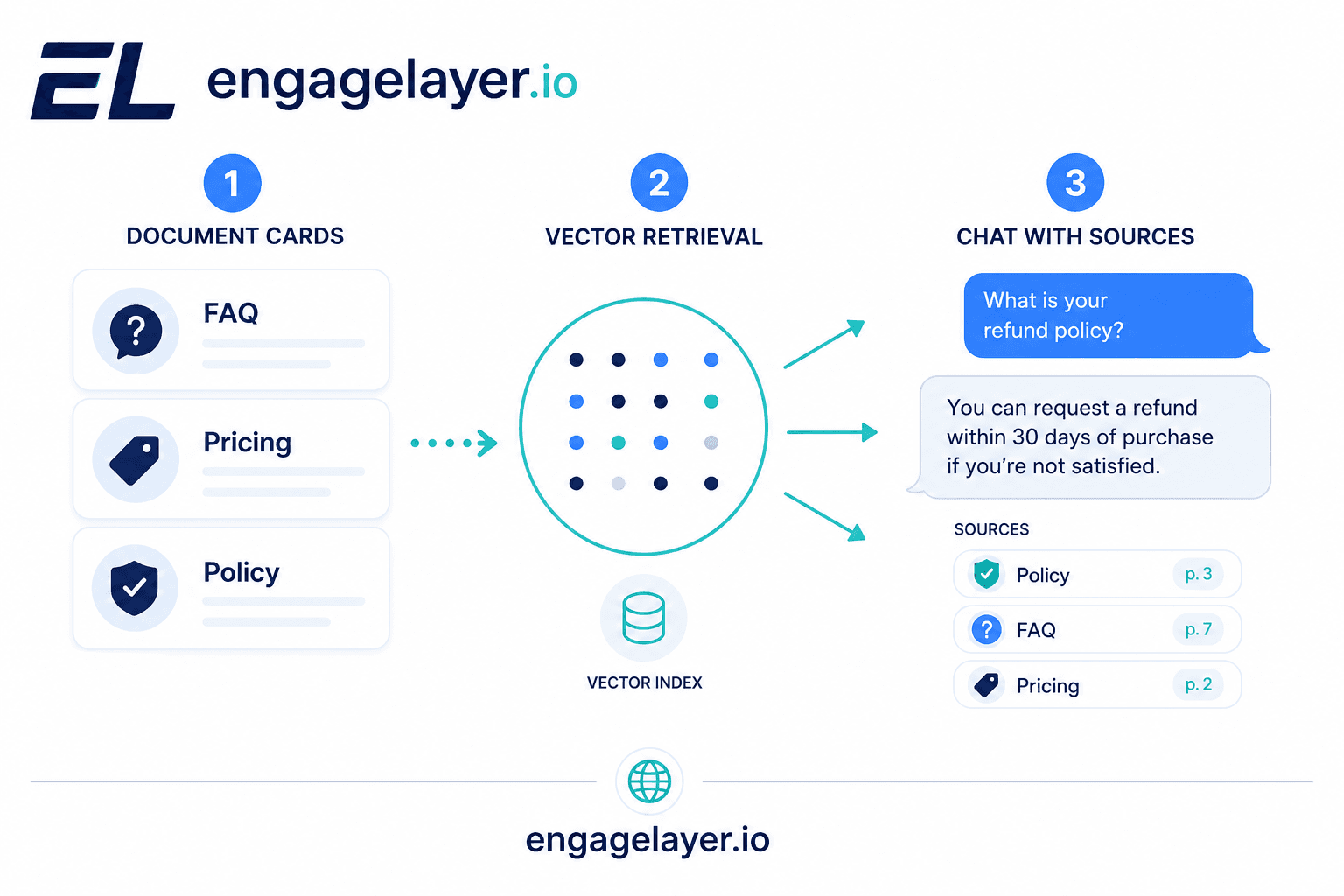
La calidad de los chunks importa más que la marca del modelo. Un PDF de 40 páginas cortado en saltos de línea al azar recuperará basura. Los pares FAQ y las secciones cortas con encabezados claros se recuperan bien. Las filas CSV con un plan por línea funcionan bien para preguntas de límites. Trata el ingest como trabajo editorial, no como una subida única.
Qué contenido cargar primero
Empieza por las diez preguntas que ventas y soporte ya responden por correo cada semana. Precios y empaquetado, términos de contrato, residencia de datos, integraciones soportadas, timeline de onboarding y lo que no está incluido en el plan base pertenecen al primer lote. Cárgalas como entradas FAQ o fuentes de texto cortas para que la recuperación acierte a la primera.
- Top 15 pares FAQ de tu deck de ventas o centro de ayuda
- Tabla de precios actual o límites de plan como filas CSV
- Resumen de seguridad y privacidad ya aprobado por legal
- Lista de integraciones con etiquetas claras in-scope vs bajo demanda
- Un doc de manejo de objeciones: por qué los clientes te eligen frente a alternativas
Añade el crawl del sitio cuando la biblioteca central esté estable. Las páginas rastreadas se desvían cuando marketing reescribe titulares; las fuentes aprobadas en el dashboard te dan un registro de cambios más limpio. Los archivos binarios como PDF a menudo necesitan una ruta worker, y el onboarding es el momento adecuado para aclarar formatos que aún no son del todo self-serve.
Cuándo rechazar una respuesta frente a capturar un lead
Un asistente fundamentado debe tener tres salidas cuando la confianza de recuperación es baja. Rechazar con claridad: decir que el conjunto de docs no cubre la pregunta y señalar un canal humano. Ofrecer un doc relacionado: enlazar la página aprobada más cercana aunque no responda del todo. Capturar un lead: pedir consentimiento, recoger datos de contacto y etiquetar la conversación Warm o Hot según señales de intención.
Rechaza lenguaje legal, médico o contractual a medida que no hayas publicado. Captura cuando el visitante pide una demo, una cotización a medida o una revisión de seguridad enterprise. Los leads Cool siguen recibiendo una respuesta cortés y un resumen por correo opcional, mientras que los leads Hot se enrutan rápido a Pipedrive, correo o tu webhook con transcript y siguiente paso recomendado.
Errores comunes de los equipos
Subir una exportación completa del sitio el primer día sin limpiar duplicados. La recuperación devuelve tres chunks en conflicto y el modelo los promedia en una respuesta incorrecta. Arréglalo curando fuentes y quitando páginas obsoletas del índice.
Tratar el chatbot como un redactor de propósito general. Los prompts que dicen ser útil en cualquier tema invitan a la deriva. Limita el asistente a tu producto, políticas y materiales publicados. Mantén el small talk corto y vuelve a los docs.
Saltar la revisión de citas en QA. Antes del lanzamiento, pasa veinte preguntas reales de compradores y comprueba cada pasaje citado contra la fuente. Si faltan citas o están mal, corrige el chunking o añade entradas FAQ en lugar de apretar adjetivos en el system prompt.
Conectar la captura de leads sin definir reglas de temperatura. No todo formulario es Hot. Usa señales de interés: pidió precios más timeline, mencionó al dueño del presupuesto, solicitó el pack de seguridad. Las preguntas Cool sobre horario de oficina no deberían avisar a ventas a medianoche.
Dónde encaja engagelayer.io
engagelayer.io es una capa de engagement web con IA pensada para este flujo. Cargas conocimiento aprobado desde el dashboard: texto inline, FAQ y CSV hoy, con crawl del sitio e ingest binario vía worker en la ruta que configures. El widget responde a visitantes desde esa biblioteca con respuestas fundamentadas, califica demanda durante el chat y entrega leads Hot / Warm / Cool a Pipedrive, correo o un webhook. El CRM nativo del MVP es Pipedrive; los equipos lo conectan y empujan leads manualmente desde el dashboard. Otros CRM pueden seguir conectándose por correo o webhook durante el onboarding.
Integras una etiqueta script en tu sitio. Sin cambios de backend de tu lado. Previsualiza el asistente antes de publicar, páusalo desde el dashboard y mantén el contenido aislado por organización. Los equipos piloto a veces reportan mayor conversión chat-a-lead cuando las respuestas citan docs reales, pero el resultado depende del tráfico, la industria y la calidad de la biblioteca; trata cualquier benchmark como ilustrativo, no como garantía.
Siguiente paso
Si tu sitio ya recibe preguntas de precios y políticas en chat o formularios, lista las diez principales y comprueba si tu widget actual puede citar una fuente aprobada para cada una. Los huecos de esa lista son tu primer lote de ingest. Cuando quieras probar respuestas fundamentadas en tus propias páginas, empieza un workspace en engagelayer.io, carga esas entradas FAQ y ejecuta chats de preview antes de poner el widget en vivo.
Esa primera pasada suele revelar si el problema es contenido faltante, chunking débil o el fallback equivocado. Arregla la biblioteca fuente antes de intentar que el modelo suene más inteligente, porque la calidad de la respuesta depende de lo que pueda recuperar.