Estrategia
Chatbot de IA vs asistente de conocimiento: ¿qué necesita su sitio B2B?
¿Chatbot con guion o asistente anclado al conocimiento? Guía de decisión para marketing y ventas en sitios B2B, con tabla comparativa y checklist.
Autor
The EngageLayer product & content team — guides on AI website assistants, knowledge-grounded answers, and B2B lead qualification.
Respuesta rápida
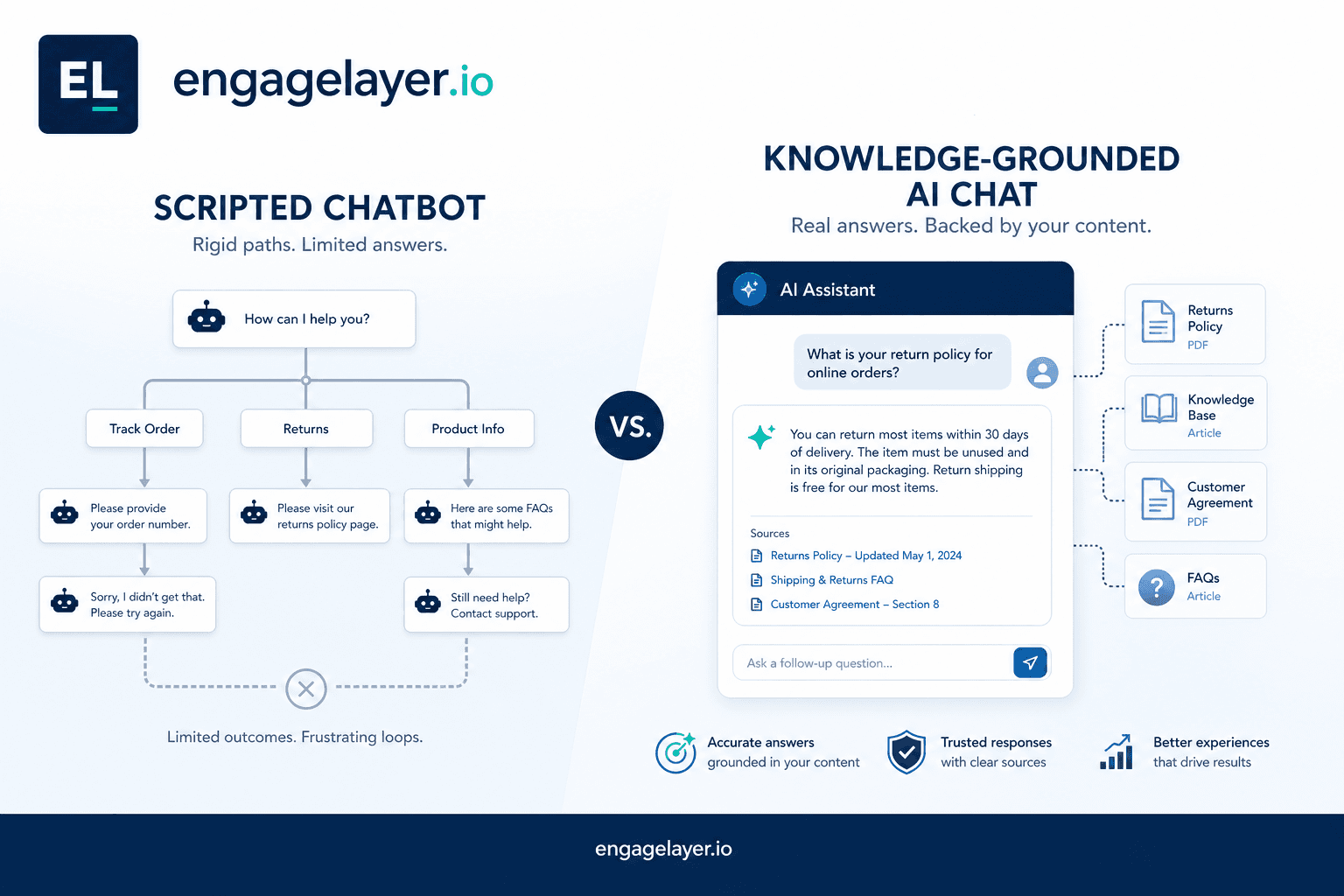
Los chatbots con guion funcionan cuando las preguntas de los visitantes son predecibles y las respuestas casi no cambian. Un asistente de sitio anclado al conocimiento encaja cuando los compradores hacen preguntas detalladas de producto y necesita respuestas ligadas a contenido aprobado de la empresa, más leads cualificados en Pipedrive, correo o webhook. Muchos equipos B2B empiezan con guiones y los superan en un trimestre.
Por qué esta elección aparece en cada hoja de ruta B2B
Los líderes de marketing y ventas oyen el mismo pitch desde dos lados. Un proveedor vende un chatbot con flujos preescritos y menús de botones. Otro vende un asistente IA de sitio que lee de una base de conocimiento antes de responder. Ambos prometen tiempos de respuesta más rápidos y más leads. En la demo las herramientas se parecen. La diferencia solo queda clara cuando un prospecto pregunta algo que su guion nunca anticipó.
Esta guía compara ambos caminos sin tratar ninguno como un fracaso. Los chatbots con guion siguen teniendo sentido para trabajos acotados, sobre todo cuando el recorrido del visitante es predecible. Los asistentes anclados al conocimiento ganan su sitio cuando la historia de producto es demasiado larga para un árbol de decisión y su equipo comercial está cansado de reenviar las mismas respuestas técnicas por correo.
Qué hace de verdad un chatbot con guion
Un chatbot con guion sigue rutas que usted define de antemano. Escribe preguntas, respuestas sugeridas y lógica de ramificación. Algunas herramientas, incluidos playbooks dentro de suites CRM, permiten asociar esos flujos a páginas o campañas concretas. Pipedrive LeadBooster es un punto de referencia útil aquí: está pensado para speed-to-lead y pasos de cualificación repetibles, no para responder una evaluación técnica de quince minutos en una sola sesión de visitante.
Los bots con guion brillan cuando el trabajo está acotado. Piense en FAQ de la página de precios, registro a un evento, reserva de una demo o enrutar a un visitante al comercial correcto según el tamaño de la empresa. El tiempo de respuesta es instantáneo porque no se genera nada en tiempo de ejecución. El cumplimiento es sencillo porque cada palabra se aprobó antes del lanzamiento. Para equipos con una lista corta de preguntas y respuestas estables, ese control es una ventaja, no una limitación.
Qué aporta un asistente anclado al conocimiento
Un asistente anclado al conocimiento recupera contenido que usted ya aprobó: entradas FAQ, fichas de producto, docs de onboarding, notas de precios y fuentes similares. Cuando un visitante pregunta cómo su integración maneja SSO o cómo se ve el calendario del piloto, el sistema busca primero en esa biblioteca y compone una respuesta con lo que encuentra. Si la respuesta no está, un asistente bien configurado lo dice en lugar de inventar detalles.
En engagelayer.io, ese patrón es la promesa central del producto. Usted carga conocimiento aprobado, inserta una etiqueta script de cdn.engagelayer.io/widget.js, y el asistente responde a los visitantes desde ese material mientras cualifica la intención durante el chat. Los leads salen del widget con una temperatura Hot, Warm o Cool más contexto que sus comerciales pueden usar, enrutados a Pipedrive, correo o webhook. El asistente no sustituye su CRM ni su sitio. Es una capa sobre el contenido que usted ya mantiene.
Comparación lado a lado
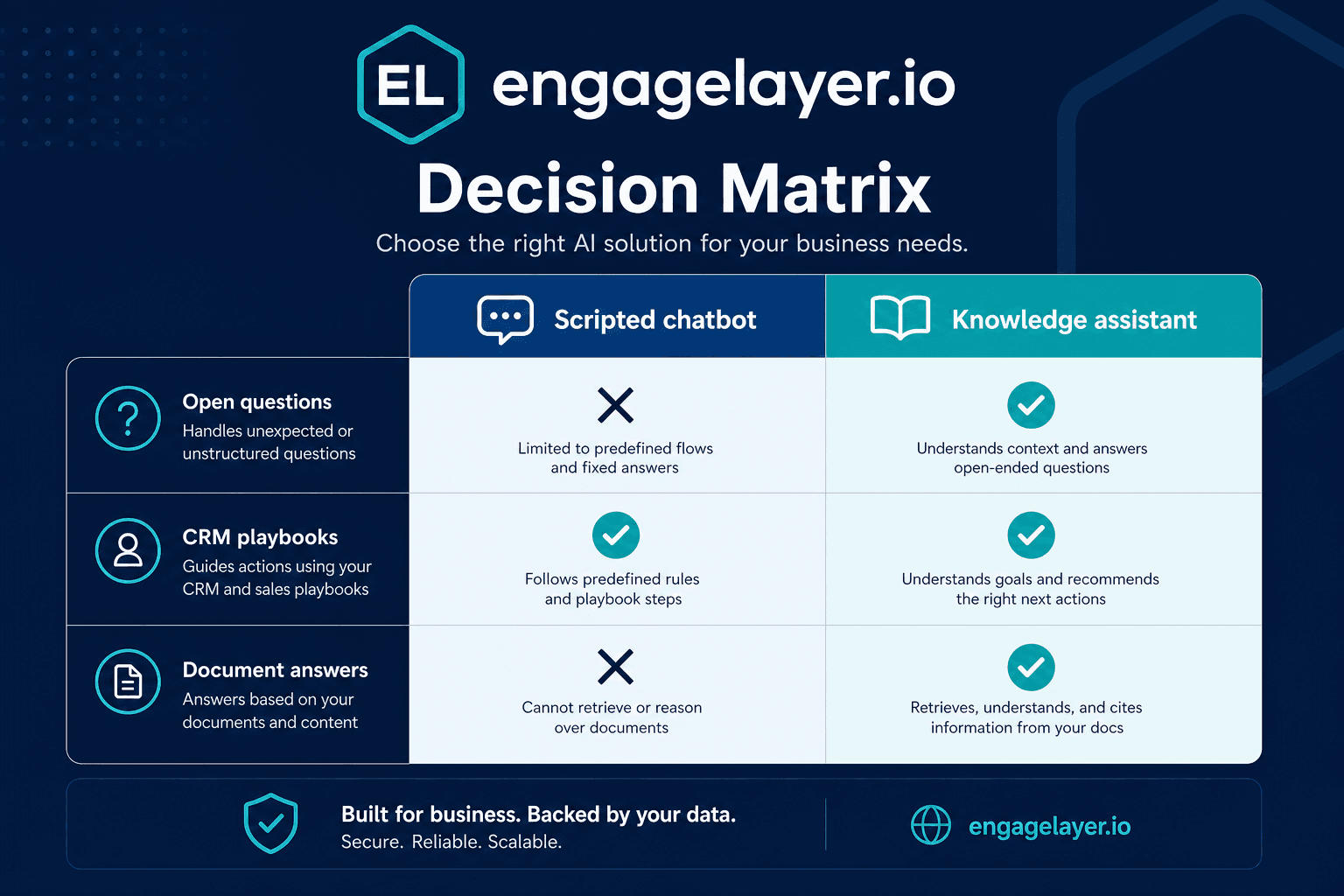
| Dimensión | Chatbot con guion | Asistente anclado al conocimiento |
|---|---|---|
| Mejor encaje | Flujos fijos, listas FAQ cortas, landing pages de campaña | Productos complejos, ciclos de venta largos, muchas preguntas técnicas |
| Fuente de la respuesta | Ramas preescritas y menús de botones que mantiene a mano | Fuentes de conocimiento aprobadas buscadas en el momento de la consulta |
| Gestión de preguntas desconocidas | Cae a un mensaje genérico o a un traspaso humano | Puede admitir lagunas, sugerir páginas relacionadas o capturar un lead |
| Mantenimiento del contenido | Editar cada rama cuando cambian precios o packs | Actualizar la fuente de conocimiento; las respuestas siguen en el siguiente ingest |
| Contexto del lead | A menudo un formulario o una solicitud de contacto sin temperatura | Transcripción, señales de interés, enrutado Hot / Warm / Cool |
| Tiempo hasta el primer valor | Días si los flujos son simples | Días a una semana una vez cargado el conocimiento núcleo |
| Ejemplo en la práctica | Playbooks de Pipedrive LeadBooster para solicitudes de demo | Widget de engagelayer.io anclado en sus docs aprobados |
La comparación suele reducirse a una pregunta: ¿quiere que el widget siga su guion, o que responda desde el contenido que su equipo ya aprobó? Parece una distinción pequeña hasta que el primer comprador hace un seguimiento que su diagrama de flujo nunca cubrió.
Cuándo basta un chatbot con guion
Quédese con guiones cuando sus visitantes hacen las mismas cinco a diez preguntas cada semana y su producto casi no cambia. Si el ciclo de venta es corto, los precios son públicos y su equipo necesita sobre todo capturar nombre y empresa antes de enrutar, un bot tipo playbook hará el trabajo sin infraestructura de retrieval.
- Ejecuta campañas de temporada con una sola llamada a la acción y sin educación profunda de producto en la página.
- Legal o cumplimiento exige que cada frase visible al visitante quede congelada antes de publicar.
- Su equipo no tiene hoy una base de conocimiento mantenida ni capacidad para construir una en los próximos treinta días.
- El traspaso humano en uno o dos clics es aceptable para todo lo que quede fuera del guion.
- El volumen de leads importa más que la profundidad, y su flujo de CRM ya está construido alrededor de capturas tipo formulario.
No es un caso de uso menor. Solo es más estrecho. Si el visitante nunca necesita preguntar más allá del menú, un flujo con guion es más fácil de mantener y menos propenso a sorprender a su equipo.
Cuándo necesita un asistente anclado al conocimiento
Pase a la vía anclada al conocimiento cuando los prospectos le comparan con dos o tres proveedores y hacen preguntas de implementación que su sitio de marketing nunca anticipó. Si product marketing publica un nuevo posicionamiento cada trimestre, mantener un guion ramificado se convierte en un segundo trabajo a tiempo completo. La recuperación desde fuentes aprobadas escala mejor que redibujar diagramas de flujo.
- Los visitantes preguntan con regularidad por integraciones, seguridad, modelos de despliegue o alcance del piloto antes de reservar una llamada.
- Su equipo comercial reenvía las mismas respuestas largas por correo porque el chat del sitio no puede manejarlas.
- Ya mantiene docs FAQ, battle cards o guías de onboarding que podrían alimentar una capa de conocimiento.
- Quiere leads etiquetados Hot, Warm o Cool con contexto de transcripción, no solo un formulario de contacto vacío.
- Pipedrive, el correo o un webhook deben recibir resúmenes cualificados sin copiar y pegar a mano desde los logs del chat.
La diferencia es la profundidad. Una vez que el visitante necesita explicaciones de producto que cambian con sus docs, un asistente de conocimiento ahorra más tiempo que un árbol de guiones más grande. Mantiene la conversación útil sin forzar a ventas a mantener cada rama a mano.
Checklist de decisión para líderes de marketing y ventas
Trabaje estas preguntas con ambos equipos en la sala. Un sí en la mayoría de los puntos del primer bloque apunta a guiones. Un sí en la mayoría de los puntos del segundo bloque apunta a un asistente de conocimiento.
- ¿Podemos listar en una pizarra cada pregunta de visitante que esperamos este trimestre?
- ¿Las respuestas cambian menos de una vez al mes?
- ¿Nuestro objetivo principal es enrutar a un humano en sesenta segundos?
- ¿Necesitamos respuestas ancladas que citen contenido aprobado de la empresa?
- ¿Los prospectos harán seguimientos que dependan de lo que dijeron hace dos mensajes?
- ¿Nuestro CRM necesita temperatura y señales de interés, no solo una dirección de correo?
- ¿Podemos asignar un responsable que mantenga las fuentes de conocimiento al día tras el lanzamiento?
Si el primer bloque describe la realidad de su equipo, use guiones y mantenga el alcance cerrado. Si el segundo bloque describe las preguntas que sus compradores hacen de verdad, empiece con un asistente anclado al conocimiento y conserve los patrones de guion solo donde aún ganen su sitio.
Si empatan, pilote ambos patrones en páginas distintas. Ejecute el guion en una página de precios o demo con intención fija. Ejecute el asistente de conocimiento en páginas de producto o integración donde las preguntas se expanden. Compare tasa de finalización, calidad de leads y tiempo de comerciales en el seguimiento tras treinta días de tráfico.
Errores habituales de los equipos
El primer error es comprar un bot de IA generativa y saltarse la capa de conocimiento. Los visitantes reciben respuestas fluidas que suenan bien y están mal. Ventas descubre el hueco en la primera llamada de discovery. El anclaje no es opcional en sitios B2B donde un detalle falso de integración mata la confianza.
El segundo error es el contrario: sobredimensionar un asistente de conocimiento antes de tener algo que recuperar. Si su contenido aprobado son tres viñetas y un logo, arregle primero el contenido. Un sistema de retrieval no puede inventar sustancia que su equipo no ha escrito.
El tercer error es tratar los playbooks de Pipedrive y un asistente de sitio como intercambiables. Los flujos tipo LeadBooster son fuertes para captura nativa en CRM y velocidad. No están pensados para responder una comparación de producto en varios pasos desde su biblioteca de documentación. Use cada herramienta para el trabajo para el que se diseñó en lugar de forzar un widget a cubrir cada página.
El cuarto error es lanzar sin un plan B. Ambos patrones necesitan un camino claro cuando el bot no puede ayudar: chat humano, enlace de calendario o un formulario corto. Los visitantes que llegan a un callejón sin salida no vuelven a probar su v2.
Cómo encaja engagelayer.io en la vía anclada al conocimiento
engagelayer.io está pensado para equipos que han superado los guiones fijos pero no quieren un chatbot genérico que improvise fuera del material aprobado. Usted carga fuentes de conocimiento en texto, FAQ y CSV desde el panel, previsualiza respuestas antes del go-live e inserta una sola etiqueta script en su sitio. El widget corre en un frame aislado, responde solo desde el contenido de su organización y envía leads cualificados a Pipedrive, correo o webhook con etiquetas Hot, Warm o Cool.
Si hoy sigue con guiones, no tiene que quitarlos el primer día. Muchos clientes mantienen un playbook simple en páginas de demo de alta intención y añaden engagelayer.io primero en secciones densas de documentación. El objetivo es alinear la herramienta con la pregunta, no elegir un ganador en un debate binario.
Siguiente paso
Si su checklist apuntó al anclaje en conocimiento, empiece por el contenido en el que ya confía: sus veinte FAQ comerciales principales y una guía de integración. Cárguelas en un espacio de vista previa, haga las mismas preguntas que plantearon sus últimos cinco deals perdidos y vea si las respuestas ancladas ahorran tiempo a su equipo. engagelayer.io ofrece una vía piloto para equipos B2B que quieren probar antes de comprometerse en todo el sitio.
El punto no es elegir un bot de moda. Es alinear el estilo de interacción con la pregunta. Cuando la respuesta es fija, escríbala en guion. Cuando la respuesta depende del contenido aprobado de la empresa, recupérela primero.