Stratégie
Qualifier les leads du site en conversation (pas via des formulaires)
Qualifiez les visiteurs inbound après des réponses fondées sur votre base de connaissances. Signaux ICP, moment pour demander l'e-mail, routage Hot/Warm/Cool et payload CRM pour Pipedrive.
Auteur
The EngageLayer product & content team — guides on AI website assistants, knowledge-grounded answers, and B2B lead qualification.
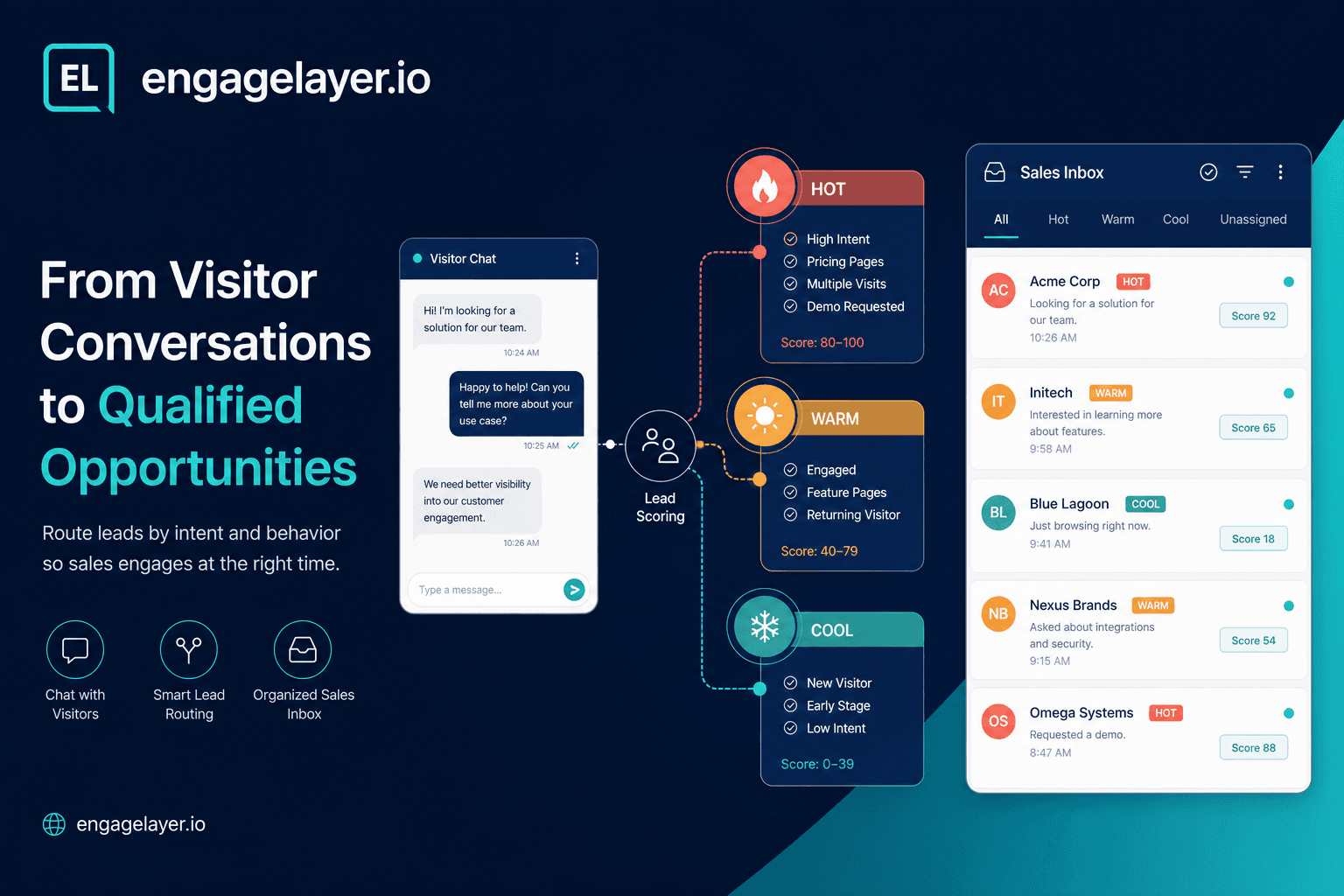
Étapes
Charger les connaissances approuvées
Ajoutez FAQ, texte produit, CSV ou pages crawlées pour que l'assistant puisse répondre avant de qualifier.
Définir les signaux ICP
Listez entreprise, rôle, douleur, calendrier et mots-clés d'intention importants pour votre motion commerciale.
Régler les poids de scoring
Alignez les poids de signaux sur ce que votre équipe priorise vraiment (demande de démo, e-mail pro, etc.).
Configurer la capture progressive
Choisissez quand le widget peut demander les coordonnées : après N messages ou sur des déclencheurs à forte intention.
Rédiger le texte de consentement
Indiquez qui assurera le suivi et comment. Stockez le consentement avec l'enregistrement du lead.
Connecter le routage
Liez Pipedrive, définissez une boîte e-mail commerciale, ou enregistrez un endpoint webhook pour les leads Hot et Warm.
Prévisualiser et intégrer
Lancez des chats de test dans l'aperçu du tableau de bord, puis intégrez le widget sur les pages pricing et produit.
Revoir la première semaine
Comparez les bandes de température aux résultats des commerciaux. Ajustez seuils et questions à partir de vraies transcriptions.
Réponse rapide
Qualifiez les visiteurs inbound après que l'assistant a répondu à partir de connaissances approuvées, pas avant. Repérez les signaux ICP pendant le chat, demandez l'e-mail seulement quand l'intention est claire, scorez Hot / Warm / Cool pour les ventes, et envoyez transcription, intérêt, température et prochaine étape vers Pipedrive, e-mail ou un webhook.
Pourquoi les équipes B2B ratent encore la demande inbound qualifiée
La plupart des sites B2B traitent chaque visiteur de la même façon : un formulaire statique, un lien calendrier, ou un widget chat qui pousse les coordonnées avant d'avoir gagné la confiance. Les ventes passent ensuite du temps sur des soumissions vagues du type "je regarde juste", tandis que des acheteurs avec budget et calendrier partent sans laisser de trace.
La qualification conversationnelle remet l'ordre des opérations. Le visiteur obtient d'abord une réponse utile. La qualification se fait dans cet échange : rôle, taille d'entreprise, cas d'usage, calendrier et signaux d'achat apparaissent naturellement. Votre équipe reçoit un lead avec du contexte, pas un champ de formulaire vide.
Répondre d'abord depuis la connaissance, qualifier ensuite
Sur engagelayer.io, l'assistant répond uniquement à partir de vos connaissances approuvées : entrées FAQ, pages produit, notes de prix que vous avez chargées, docs d'intégration et contenus support. Si le pricing n'est pas dans la base de connaissances, l'assistant le dit et propose un chemin de suivi au lieu d'inventer des chiffres.
Cet ancrage compte pour la qualification. Quand un visiteur demande comment votre produit se connecte à Pipedrive ou à quoi ressemble l'onboarding, il apprend quelque chose de réel. Ses questions suivantes révèlent l'intention : calendrier d'implémentation, taille d'équipe, comparaison avec un concurrent nommé. Vous qualifiez sur la densité de signaux, pas sur la vitesse à laquelle vous collectez un e-mail.
Signaux ICP à écouter dans le chat
Votre profil client idéal doit se traduire en signaux de chat observables. Vous n'avez pas besoin de vingt cases à cocher. Vous avez besoin d'une courte liste de faits qui changent la façon dont les ventes priorisent le fil.
- Entreprise ou équipe identifiée (nom, secteur, tranche d'effectifs)
- Rôle qui peut acheter ou fortement influencer (ops lead, fondateur, responsable IT)
- Douleur claire liée à votre catégorie produit (transferts manuels, réponse lente, mauvaises données CRM)
- Spécificité du cas d'usage (intégration Pipedrive, déploiement multi-sites, exigence de conformité)
- Langage de calendrier (ce trimestre, avant le renouvellement, évaluation en cours)
- Indices de budget ou de volume (nombre de sièges, tranche de deal, dépense outil actuelle)
- Contexte de page à forte intention (pricing, démo, intégrations, URL contact-sales)
- Domaine e-mail professionnel plutôt qu'une boîte personnelle
engagelayer.io score ces signaux automatiquement. Chaque correspondance ajoute du poids. Un visiteur qui nomme une entreprise, demande l'implémentation et sollicite une démo accumule plus de points que quelqu'un qui a seulement lu la FAQ de la page d'accueil.
Quand demander l'e-mail (et quand ne pas le faire)
Demander l'e-mail dès le premier message apprend aux visiteurs à traiter votre widget comme du spam. Le meilleur schéma est la capture progressive : répondre à la question, offrir un suivi pertinent, puis inviter les coordonnées quand la conversation a une intention commerciale claire.
Bons moments pour demander : le visiteur a demandé le pricing ou une démo, posé des questions sur les termes du contrat, décrit un projet avec un calendrier, ou atteint un trou de connaissance que vous ne pouvez pas combler en chat (devis personnalisé, revue sécurité, palier enterprise). Mauvais moments : questions génériques "que faites-vous", sorties après un seul message, ou demandes clairement hors ICP où une redirection polie suffit.
Associez toujours la demande à une raison. "Je peux faire envoyer un devis adapté à votre setup Pipedrive. Quelle est la meilleure adresse e-mail professionnelle ?" bat "Veuillez laisser votre e-mail" sans contexte.
Hot, Warm et Cool : que doivent faire les ventes ensuite
La température est une étiquette de priorisation, pas un jugement moral. engagelayer.io mappe les signaux de conversation sur un score de 0 à 100, puis assigne une bande : Hot à 70 et plus, Warm de 40 à 69, Cool en dessous de 40. Les ventes peuvent filtrer la boîte au lieu de lire chaque transcription depuis zéro.
| Bande | Signaux typiques | Action commerciale recommandée |
|---|---|---|
| Hot | Demande de démo ou de pricing, indice décideur, calendrier ce trimestre, e-mail pro, long fil engagé | Suivi personnel sous quelques heures ; reprendre leurs questions exactes dans le message |
| Warm | Cas d'usage clair, un peu de contexte entreprise, profondeur de messages modérée, intérêt sans urgence de calendrier | Suivre sous un à deux jours ouvrés avec une ressource adaptée ou une proposition d'appel court |
| Cool | Recherche précoce, intérêt vague, visite courte, e-mail personnel seulement, fit hors ICP | Ajouter à une séquence nurture ou envoyer un lien utile ; ne pas brûler du temps commercial sur des appels immédiats |
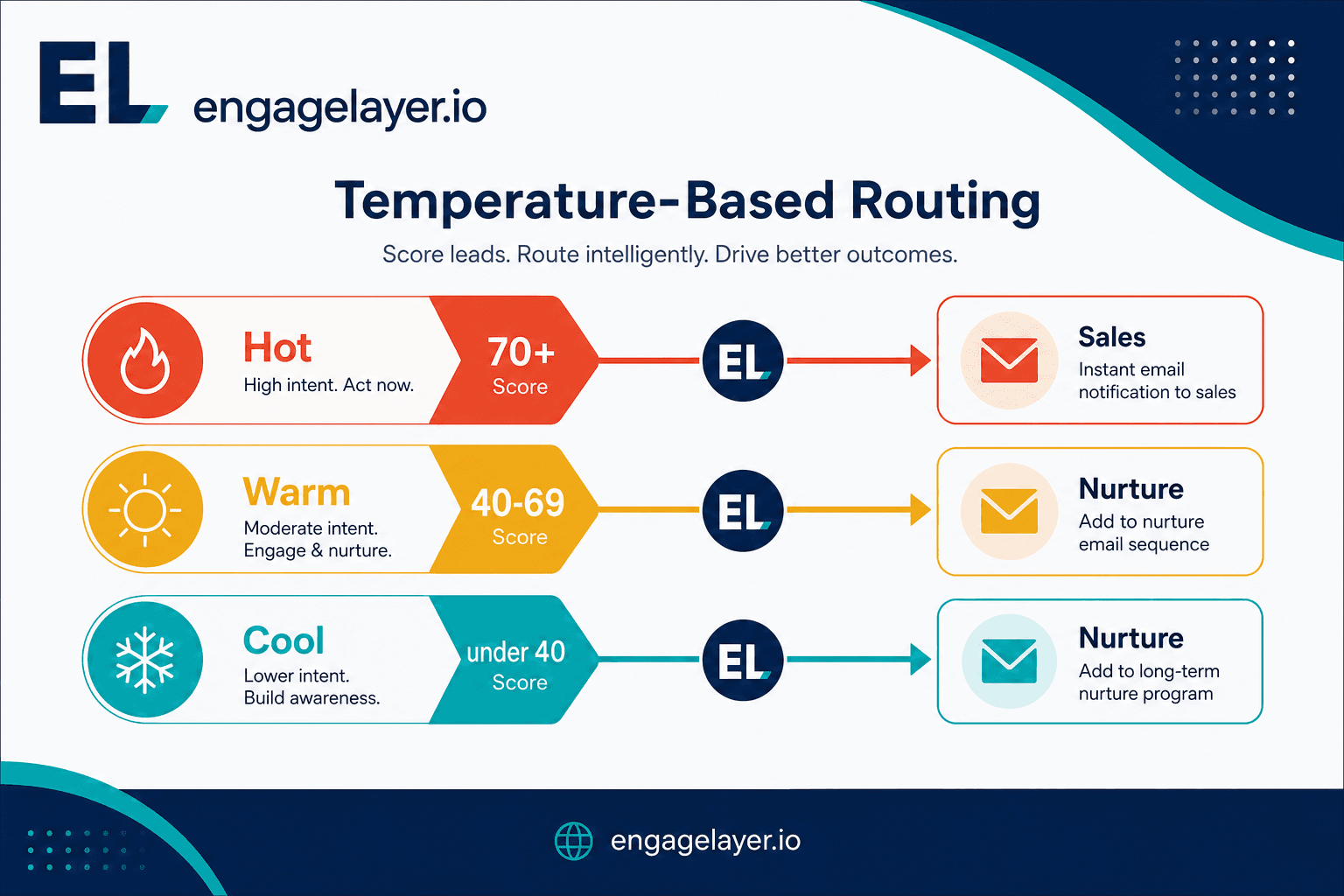
Les bandes alignent l'équipe sur l'urgence. Hot signifie agir vite, Warm rester pertinent, et Cool garder un suivi plus léger jusqu'à ce que l'acheteur montre plus d'intention.
Ce qui doit arriver dans votre CRM
Un lead qualifié ne sert à rien si le CRM ne stocke que le nom et l'e-mail. Payload minimale dont les ventes ont besoin après une capture conversationnelle :
- Transcription complète ou résumé IA de la conversation
- Zone d'intérêt principale (p. ex. intégration Pipedrive, palier de pricing, revue sécurité)
- Température du lead (Hot / Warm / Cool) et score
- Prochaine étape recommandée en langage clair
- Champs contact collectés avec consentement (nom, e-mail, téléphone, entreprise)
- URL source et langue lorsque disponibles
- Signaux de qualification correspondants pour audit (démo demandée, calendrier mentionné, etc.)
En MVP, engagelayer.io se connecte à Pipedrive avec push manuel depuis le tableau de bord. Les résumés e-mail et webhooks personnalisés restent toujours disponibles pour d'autres stacks ou un routage temporaire. HubSpot, Salesforce et connecteurs natifs similaires ne sont pas encore livrés ; utilisez webhook ou e-mail jusqu'à ce que votre parcours d'onboarding ajoute une intégration directe.
Consentement et capture des contacts
Le consentement est explicite, pas implicite. Avant de persister e-mail ou téléphone, l'assistant doit indiquer ce qui se passe ensuite : qui contactera le visiteur, par quel canal, et qu'il peut se désinscrire. Stockez l'horodatage du consentement et le libellé affiché. Cela vous aligne sur des attentes de type RGPD et réduit les plaintes quand les ventes rappellent sous l'heure un lead Hot.
Ne scrapez pas silencieusement les e-mails depuis le texte des messages sauf si votre politique et l'UI le rendent clair. Les formulaires progressifs dans le widget, déclenchés après avoir livré de la valeur, convertissent mieux et créent une piste d'audit plus propre.
Routage : Pipedrive, e-mail et webhook
La plupart des équipes commencent par des résumés e-mail vers une boîte commerciale partagée pendant qu'elles ajustent les règles de qualification. Quand Pipedrive est connecté, les commerciaux poussent les leads Hot dans une étape de pipeline avec la transcription jointe. Les webhooks conviennent aux équipes RevOps qui enrichissent les leads dans une couche middleware avant l'insertion CRM.
- Pipedrive (natif MVP) : push manuel avec intérêt, température et lien de conversation
- E-mail : digest toujours actif par lead capturé pour les petites équipes
- Webhook : payload JSON vers votre endpoint pour CRM custom ou alertes type Slack
Routez les leads Hot vers les propriétaires immédiats, Warm vers une file partagée, et Cool vers l'automatisation marketing seulement si vous avez un parcours nurture. Mal router des leads Cool vers des seniors est l'un des moyens les plus rapides de tuer l'adoption.
Questions de qualification qui fonctionnent en pratique
Les questions doivent ressembler à un consultant utile, pas à un sondage. Reliez chaque demande à quelque chose que le visiteur a déjà dit.
- Vous avez mentionné un déploiement sur plusieurs sites clients. Environ combien de propriétés utiliseraient l'assistant en première phase ?
- Évaluez-vous cela pour votre propre équipe, ou pour des clients que vous accompagnez ?
- Quel CRM utilisez-vous aujourd'hui, et faut-il y journaliser les conversations automatiquement ?
- Y a-t-il une échéance qui pousse la recherche, comme un renouvellement de contrat ou une date de lancement ?
- Qui d'autre que vous devrait valider un outil comme celui-ci ?
- Un parcours de 20 minutes centré sur votre workflow Pipedrive serait utile, ou préférez-vous d'abord le pricing écrit ?
Une question forte par tour bat un formulaire à cinq champs jeté au milieu du chat. Laissez le visiteur répondre, puis approfondissez seulement là où la réponse ouvre un vrai chemin de qualification.
Erreurs qui gaspillent le temps des commerciaux
Bloquer chaque réponse derrière un champ e-mail est l'échec le plus courant. Les visiteurs partent avant d'apprendre quoi que ce soit, et les contacts que vous collectez tout de même penchent vers les bots et les candidats. Le volume de leads paraît correct dans un tableur ; la qualité du pipeline, non.
Laisser l'assistant inventer des prix ou des politiques détruit la confiance en un message. Si votre base omet les prix catalogue, entraînez le fallback à proposer un suivi humain. Un mauvais chiffre en chat est plus dur à défaire que le silence.
Envoyer chaque lead aux ventes avec la même urgence brûle votre équipe. Sans bandes Hot / Warm / Cool, les commerciaux ignorent la boîte parce que tout se ressemble. Ajustez les seuils après deux semaines de trafic réel au lieu de deviner le premier jour.
Ne déposer que le nom et l'e-mail dans le CRM force les commerciaux à réinterviewer l'acheteur. La transcription et la prochaine étape recommandée sont le produit du chat ; les omettre, c'est payer l'automatisation tout en gardant le travail manuel.
Qualifier avant d'avoir du contenu pour répondre produit un non-sens qui sonne confiant. Chargez d'abord FAQ, produit et connaissances d'intégration, puis activez des règles de capture agressives.
Checklist de lancement
Un bon lancement est surtout un contrôle de discipline. L'assistant doit répondre depuis du contenu approuvé, le scoring doit refléter la façon dont votre équipe travaille vraiment, et la passation doit être visible avant de laisser le widget tourner sur des pages importantes.
- Connaissances approuvées chargées : FAQ, textes produit, notes de prix que vous assumez, pages d'intégration
- Liste de signaux ICP rédigée et mappée aux poids de scoring
- Règles de capture e-mail progressive définies (profondeur minimale de messages ou déclencheur d'intention)
- Seuils Hot / Warm / Cool revus avec les ventes (coupures par défaut 70 / 40)
- Texte de consentement approuvé pour votre juridiction
- Pipedrive, boîte e-mail ou destination webhook testés avec un faux lead
- Chats de preview lancés pour les cinq questions visiteurs principales
- Widget intégré sur les pages à forte intention (pricing, intégrations, produit)
- Revue de la première semaine planifiée : quels signaux ont prédit des conversations abouties
Une fois ces éléments en place, vous avez assez de signal pour ajuster au lieu de deviner. La première semaine doit indiquer si les questions sont justes, si les seuils sont justes, et si la payload CRM donne aux ventes assez de contexte pour agir.
Où s'inscrit engagelayer.io
engagelayer.io est une couche d'engagement IA pour sites B2B : connaissances approuvées, chat visiteur, qualification par signaux, et livraison vers Pipedrive, e-mail ou webhook. Ce n'est pas un remplacement de CRM ni un chatbot générique sans ancrage. Vous intégrez une balise script avec votre clé publique, configurez connaissances et routage dans le tableau de bord, et prévisualisez avant publication.
Si vos visiteurs inbound lisent déjà vos docs mais partent sans parler aux ventes, la qualification conversationnelle est l'étape manquante entre le content marketing et le pipeline. Commencez par des réponses fondées, ajoutez la capture quand l'intention est visible, et routez les bandes de température pour que les commerciaux appellent d'abord les bonnes personnes.